
Choosing a crop
Type your question first. When Growi needs a crop and none is active, it shows a crop card. Your choice stays for the rest of the conversation, and Growi reads only the modules linked to that crop.
Pick a crop on the card
Section titled “Pick a crop on the card”- Ask for data, a graph, a report or advice, for example “What was the temperature last night?”. Growi shows the crop card, also when you have one crop.
- Open a crop group. All groups start folded. Each crop has a tick box, its name and its start and end date.
- Type in Search groups & cycles… to filter on crop name and group name.
- Tick the crop and click Send.
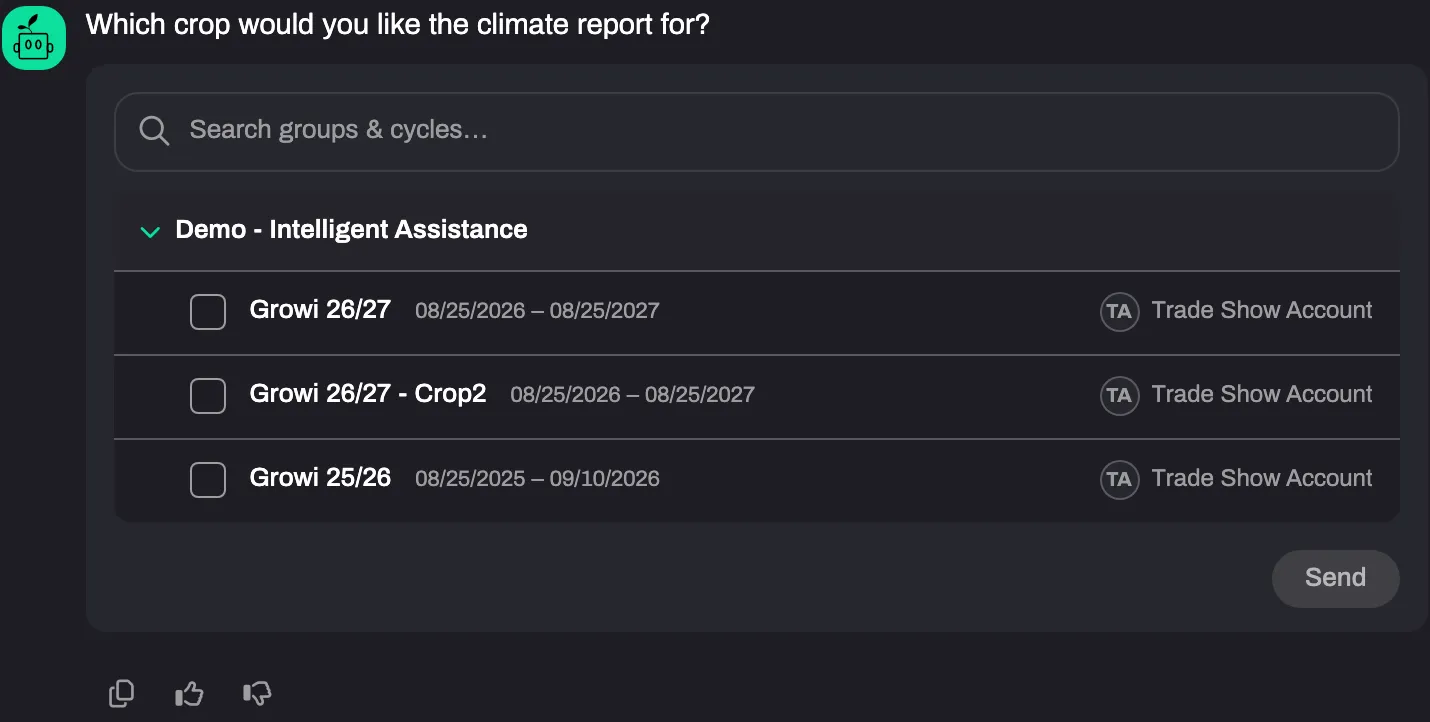
Inside a group the running crops come first and the finished crops after them. A crop counts as finished when its end date has passed or when it has no end date. You can still pick it and ask about it.
A crop a colleague administers sits in the group you share, between your own crops, with the administrator’s initials and name on the right. Groups in which every crop has finished are behind the Show archived crop groups switch.
Name the crop in your question
Section titled “Name the crop in your question”Name the crop, compartment, group, variety or crop type in the question (“How warm was compartment 3 last night?”). When exactly one running crop matches, Growi skips the card. When several match, the card shows only those. When the match is likely but not sure, the card opens with that crop ticked, and you confirm it. A finished crop is never matched by name. Pick it on the card. Naming the crop that is already active, or in a comparison exactly the crops already selected, does not show the card again.
Compare crops
Section titled “Compare crops”- Tick two or more crops on the card, up to 15.
- Click Send. The answers that follow compare those crops.
Under a comparison table Growi lists the dates it used per crop. See How Growi shows an answer. When one of the crops has finished, Growi does not compare “now”: it sets the cycles against each other at the same point, such as the same weeks after planting.
A report and the ventilation analysis run for one crop: the crop you name, or else the first crop of the comparison. Growi says which crop it used, and that crop becomes the active crop.
Switch or clear the crop
Section titled “Switch or clear the crop”The bar above the chat starts with Crop cycle, then the group and the crop. Name another crop in a later question to switch to it. Click the cross on the bar (Detach crop context) to clear the crop. The next data question shows the card again. In a comparison the bar has a chip per crop: the cross on a chip (Remove crop) drops that crop and Clear comparison drops them all.
Troubleshooting
Section titled “Troubleshooting”- The card doesn’t show your crop. Look inside its group, after the running crops, and turn on Show archived crop groups.
- Growi says it found no crop groups or no crops. See Which data Growi can access.