Privacy and data handling
Intelligent Assistance stores your conversations, feedback, custom instructions, crop memory, schedules and reports under your own user. Its services and storage run in the Azure region West Europe. Deleting a chat, a report or a schedule does not remove everything that belongs to it: the table below says what stays.
Overview
Section titled “Overview”Growi reads your LetsGrow data with your own login, so it sees what your account may see. See Which data Growi can access.
The services of Intelligent Assistance and their storage run in the Azure region West Europe. The language model is reached through Azure OpenAI, with an endpoint and a key that LetsGrow sets up.
Usage events go to a product analytics service that stores its data in the EU. An event holds your login name, your user id, your company id and the kind of action, such as “a chat message was sent” or “a schedule was created” with its frequency and topics. It does not hold the text of your question or of the answer.
Every request you make to Intelligent Assistance is also recorded in LetsGrow’s monitoring, with your user id, your company id, the kind of request, its result and how long it took. This is how LetsGrow traces a reported problem to the affected customer. The text of a question or an answer is not recorded there either.
Configuration / parameters
Section titled “Configuration / parameters”| What is stored | What it holds | What you can do |
|---|---|---|
| Conversations | Your questions, the answers, the crop you chose and the data behind each answer card. Each answer also keeps a copy of the custom instructions that applied when it was written | Delete the conversation. Rated answers stay, see below |
| Feedback on an answer | The rating, your comment and the time, stored on that answer | Nothing. You cannot delete a rating or a comment |
| Your name | Your display name from LetsGrow, kept for 90 days after you last used Intelligent Assistance, so the LetsGrow team sees who gave feedback | Nothing. It expires by itself |
| Feedback on a point of attention | The rating and your comment, with a copy of the text of the point and the names of the crop and the crop group | Nothing. It stays when the report is deleted |
| Custom instructions | The text you saved, per user | Change or clear them |
| Crop memory | The notes Growi writes, per user and per crop | There is no screen to view, edit or delete them. See Custom instructions and crop memory |
| Reports | Every generated report, also one you asked for in chat | The owner deletes it with Delete report |
| Report schedules | The schedule and its shares | Delete the schedule. Its reports stay |
Only you can open your conversations. When you rate an answer, the full conversation and your feedback are shared with LetsGrow. A thumbs down also alerts the LetsGrow team straight away, with a short description of what probably went wrong. That description paraphrases: it never quotes your words and names no people or companies. See Giving feedback.
What deleting removes
Section titled “What deleting removes”| You delete | Removed | Kept |
|---|---|---|
| A chat | The conversation and its messages | Every answer you rated, with the question just before it, as feedback for LetsGrow |
| A report | The report | The ratings you gave on its points, each with a copy of the text of the point |
| A schedule | The schedule and its shares | The reports the schedule already made. Delete those one by one |
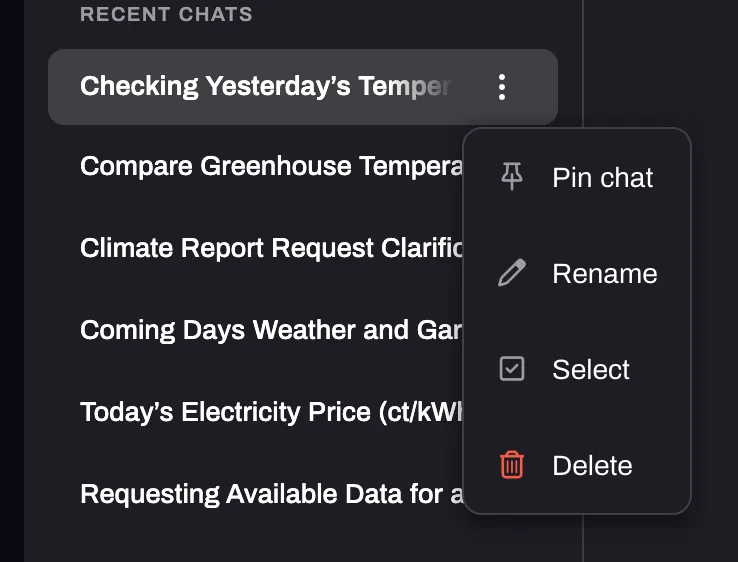
To delete a chat, open the menu behind the three dots of the conversation and click Delete. The confirmation is titled Delete chat?.